The guessing game
Overtired? Undertired? When’s nap?
You’re doing the math in your head: last wake, last nap duration, that one late bedtime. Every stretch becomes a decision. Miss the window, and the next one is harder. You shouldn’t have to guess the hour.
- Is my baby overtired?
- Undertired?
- When’s nap time?
- Did I miss the window?
Sleep Window
Stop guessing. See the next sleep window
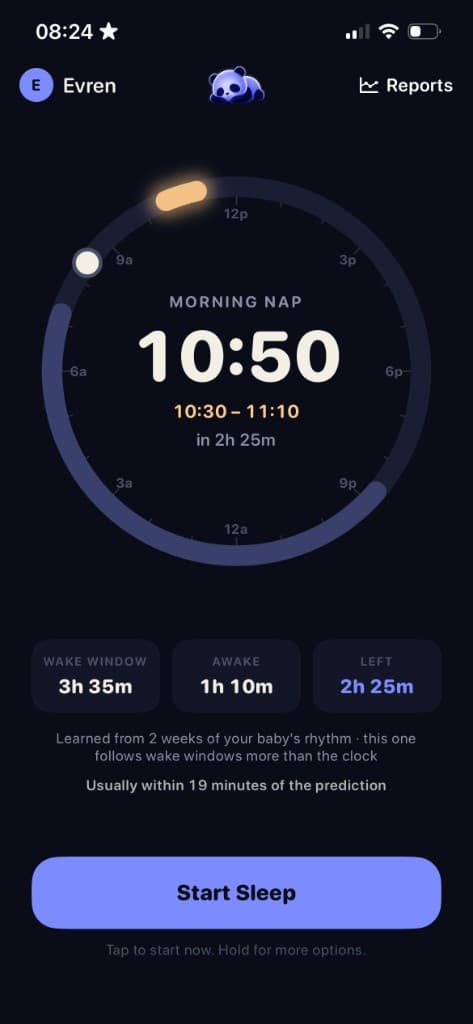
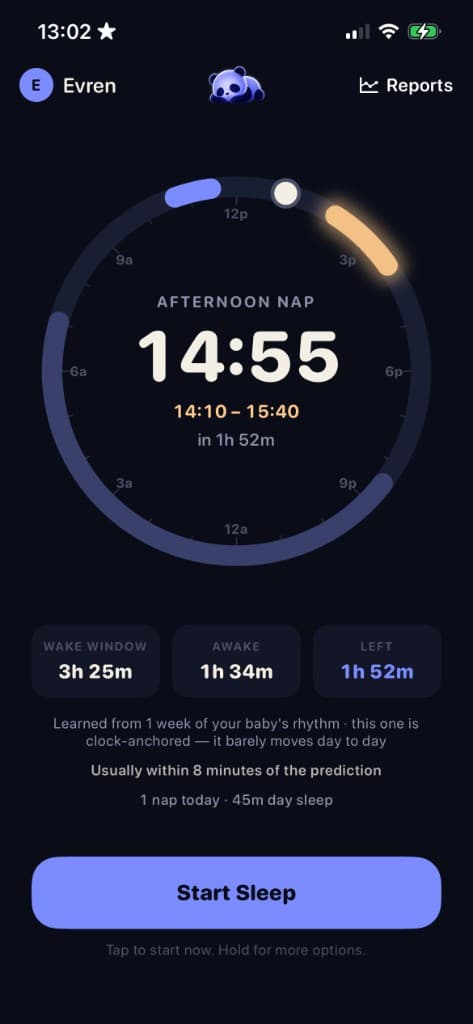
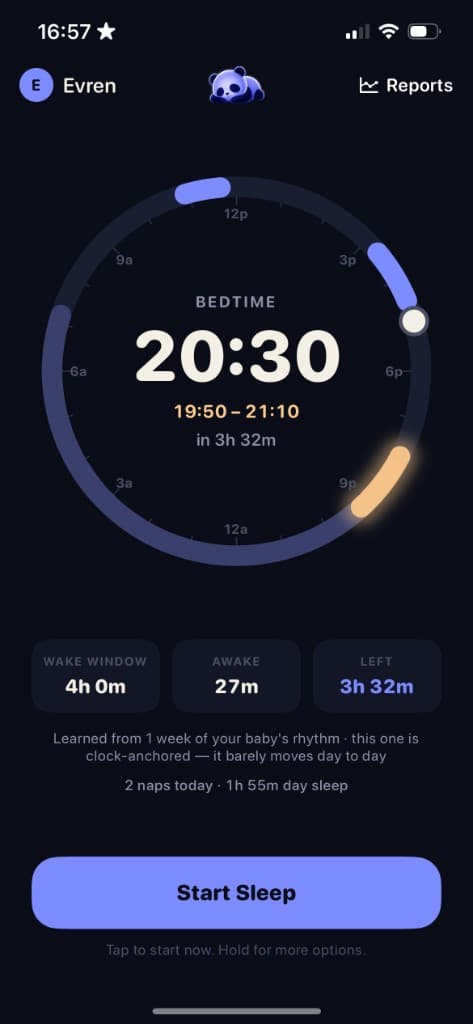
Napple learns your baby’s rhythm and shows when sleep is due. The next sleep window and the exact predicted time appear on the clock.
- #1
Log a sleep
One tap to start, one tap to end. Hold to backdate if you missed it.
- #2
See what’s next
The next sleep window and predicted time, on the clock.
- #3
Get notified
A reminder when the window opens, so you don’t watch the clock.
Less guesswork. More settled sleeps.
Predict the next sleep, log in one tap, and see the day clearly. Spend less time guessing and more time resting.
Predictions · 1 of 3
Next sleep predictions
Learns your baby’s rhythm and shows when the next sleep is due.
Sleep Guide
Sleep by month, 0–24.
Nap schedules, wake windows, and transitions, with notes from AAP, NHS, and Sleep Foundation. Typical ranges, not a rigid timetable.
Read the baby sleep guide →
FAQ
Using Napple
How does Napple predict my baby’s next nap?
Napple learns from the sleeps you log. The clock shows the next sleep window, with the exact predicted time. It follows your baby’s rhythm, not a generic schedule.
How accurate are the predictions, and do they improve over time?
They get closer as you log more sleeps, because Napple keeps learning from recent days. Every baby is different, and some days will miss. Use it as a timing aid, not a guarantee.
What age range is Napple designed for?
You can start logging from newborn. Sleep Window predictions are most useful from around 4 months, when days are a bit more regular.
Can multiple caregivers log and track sleep for the same baby?
Yes. Create an account, then sign in on the other phone with the same email and password. That keeps one shared sleep history. Sync stays free so the log doesn’t split. One Pro subscription covers the household.
Does Napple work without an internet connection?
Yes. Logging stays on your iPhone. A connection is only needed when you want family sync to update the other phone.
Does Napple send notifications, and can I customize them?
Yes. Napple can remind you when the next sleep window opens, and show updates on the Lock Screen. You can turn those off in Account, under Alerts & Lock screen, during the 14-day preview or with Pro.
What’s included in the free version vs. Pro?
After the first 14 days, logging, editing, and family sync stay free. Reports show the last 14 days. Napple Pro unlocks Sleep Window predictions, Lock Screen updates, reminders, and full report history.
How does the 14-day preview work, and do I need to enter payment info upfront?
Your first 14 days include the full app automatically. You don’t enter payment info to start. After day 14, logging and family sync stay free. Pro is optional if you want to keep Sleep Window predictions and the extras.
Can I cancel anytime?
Yes. Napple Pro is an Apple subscription. Cancel in iOS Settings, Apple ID, Subscriptions, at least 24 hours before the period ends. Deleting a Napple account does not cancel the Apple subscription.
Is my baby’s data private and secure?
We don’t sell personal information, and we don’t use ads or cross-app tracking. Logs stay on your iPhone unless you create an account. Then the history is stored so both caregivers can see and update it. Details are in our Privacy Policy.
Does Napple require an account or email to use?
No. You can log on your iPhone without an account. Create a family account when you want a second phone, or a backup in the cloud. An account is not required to buy Pro.
Know when the next sleep is due.